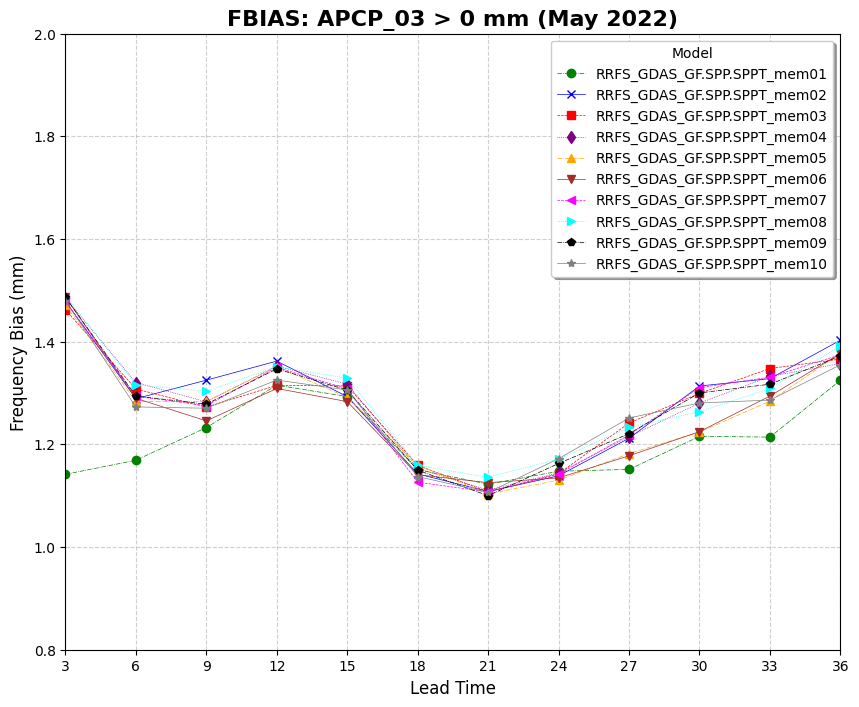
Plotting Use Case: FBIAS Across Models
This use case demonstrates how to use VCasT’s plotting module to generate a comparison of FBIAS scores across multiple models using pre-processed MET statistics.
It uses a sample configuration file (plot.yaml) to create a line plot based on an aggregated dataset.
Prerequisites
Before running the example, you need an input file APCP_agg.data created in the previous use case MET Stat Use Case: FBIAS Across Models.
Run the Example
Clone the test repository:
git clone https://github.com/NOAA-GSL/VCasT-tests
cd VCasT-tests/examples/MET/fbias_multiple_models
Run VCasT with the plotting YAML file:
vcast plot.yamlThis will generate the FBIAS comparison plot.
YAML Configuration Explained
Below is the content of plot.yaml, which configures VCasT to:
Load a pre-aggregated CSV file with FBIAS values
Plot fcst_lead on the x-axis and FBIAS on the y-axis
Differentiate models
Filter the plot to include only the fbias metric
 1start_date: "2024-04-29_12:00:00"
 2end_date: "2024-05-31_12:00:00"
 3interval_hours: "1"
 4
 5average: false
 6scale: 1
 7
 8plot_type: line
 9
10fcst_var: APCP_03
11
12unique:
13 - model: "RRFS_GDAS_GF.SPP.SPPT_mem01"
14 - model: "RRFS_GDAS_GF.SPP.SPPT_mem02"
15 - model: "RRFS_GDAS_GF.SPP.SPPT_mem03"
16 - model: "RRFS_GDAS_GF.SPP.SPPT_mem04"
17 - model: "RRFS_GDAS_GF.SPP.SPPT_mem05"
18 - model: "RRFS_GDAS_GF.SPP.SPPT_mem06"
19 - model: "RRFS_GDAS_GF.SPP.SPPT_mem07"
20 - model: "RRFS_GDAS_GF.SPP.SPPT_mem08"
21 - model: "RRFS_GDAS_GF.SPP.SPPT_mem09"
22 - model: "RRFS_GDAS_GF.SPP.SPPT_mem10"
23
24vars:
25  - fbias: "./APCP_agg.data"
26
27plot_title: "FBIAS: APCP_03 > 0 mm (May 2022)"
28legend_title: "Model"
29labels:
30  - "RRFS_GDAS_GF.SPP.SPPT_mem01"
31  - "RRFS_GDAS_GF.SPP.SPPT_mem02"
32  - "RRFS_GDAS_GF.SPP.SPPT_mem03"
33  - "RRFS_GDAS_GF.SPP.SPPT_mem04"
34  - "RRFS_GDAS_GF.SPP.SPPT_mem05"
35  - "RRFS_GDAS_GF.SPP.SPPT_mem06"
36  - "RRFS_GDAS_GF.SPP.SPPT_mem07"
37  - "RRFS_GDAS_GF.SPP.SPPT_mem08"
38  - "RRFS_GDAS_GF.SPP.SPPT_mem09"
39  - "RRFS_GDAS_GF.SPP.SPPT_mem10"
40
41line_color:
42  - "green"
43  - "blue"
44  - "red"
45  - "purple"
46  - "orange"
47  - "brown"
48  - "magenta"
49  - "cyan"
50  - "black"
51  - "gray"
52
53line_marker:
54  - "o"
55  - "x"
56  - "s"
57  - "d"
58  - "^"
59  - "v"
60  - "<"
61  - ">"
62  - "p"
63  - "*"
64
65line_type:
66  - "-."
67  - "-"
68  - "--"
69  - ":"
70  - "-."
71  - "-"
72  - "--"
73  - ":"
74  - "-."
75  - "-"
76
77line_width:
78  - 0.5
79  - 0.5
80  - 0.5
81  - 0.5
82  - 0.5
83  - 0.5
84  - 0.5
85  - 0.5
86  - 0.5
87  - 0.5
88
89output_filename: stat_FBIAS_APCP.png
90
91x_label: "Lead Time"
92y_label: "Frequency Bias (mm)"
93ylim: [0.8, 2.0]
94xlim: [0,11]
95grid: true
96yticks:
97xticks: [0,1,2,3,4,5,6,7,8,9,10,11]
Output
The generated plot will be saved to the location specified by output_filename, such as stat_FBIAS_APCP.png.