Plotting Use Case: Categorical Scores
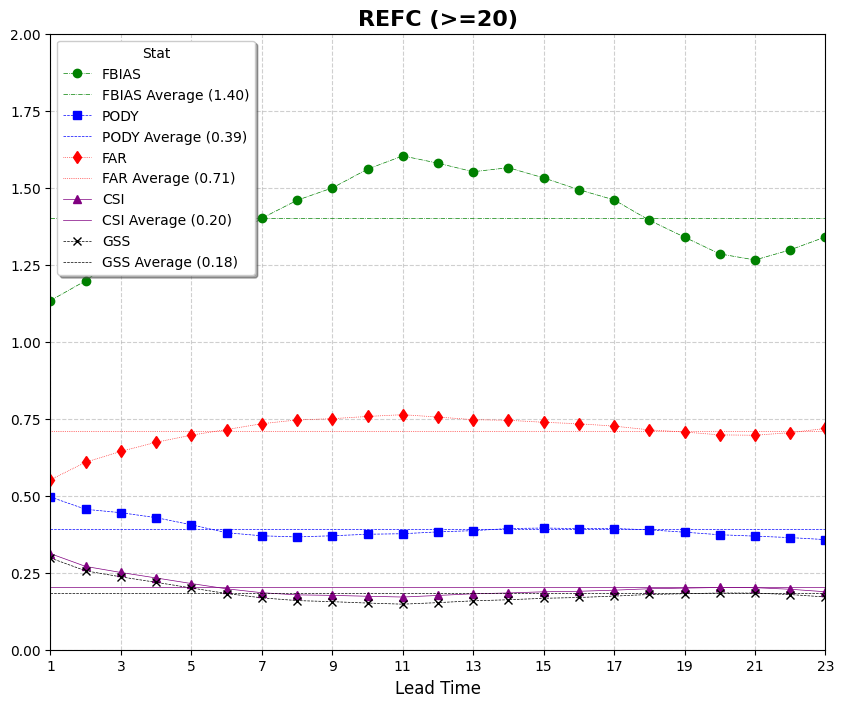
This use case demonstrates how to use VCasT’s plotting module to visualize categorical verification metrics such as POD, FAR, CSI, FBIAS, and GSS for reflectivity forecasts.
It uses a sample configuration file (plot.yaml) to create a line plot from an aggregated dataset.
Prerequisites
Before running the example, you need an input file REFC_agg.data created in the previous use case MET Stat Use Case: Categorical Scores.
Run the Example
Clone the test repository:
git clone https://github.com/NOAA-GSL/VCasT-tests
cd VCasT-tests/examples/MET/cts_metrics
Run VCasT with the plotting YAML file:
vcast plot.yamlThis will generate plots for the specified categorical metrics.
YAML Configuration Explained
Below is the content of plot.yaml, which configures VCasT to:
Load a pre-aggregated CSV file with categorical scores
Plot fcst_lead on the x-axis and metric values on the y-axis
Include multiple metrics like pod, far, csi, fbias, and gss
 1start_date: "2024-04-29_12:00:00"
 2end_date: "2024-05-31_12:00:00"
 3interval_hours: "1"
 4
 5average: true
 6scale: 1
 7
 8plot_type: line
 9
10fcst_var: REFC
11
12vars:
13  - fbias: "./REFC_agg.data"
14  - pody: "./REFC_agg.data"
15  - far: "./REFC_agg.data"
16  - csi: "./REFC_agg.data"
17  - gss: "./REFC_agg.data"
18
19unique:
20
21plot_title: "REFC (>=20)"
22legend_title: "Stat"
23labels:
24  - "FBIAS"
25  - "PODY"
26  - "FAR"
27  - "CSI"
28  - "GSS"
29
30line_color:
31  - "green"
32  - "blue"
33  - "red"
34  - "purple"
35  - "black"
36
37line_marker:
38  - "o"
39  - "s"
40  - "d"
41  - "^"
42  - "x"
43
44line_type:
45  - "-."
46  - "--"
47  - ":"
48  - "-"
49  - "--"
50
51line_width:
52  - 0.5
53  - 0.5
54  - 0.5
55  - 0.5
56  - 0.5
57
58output_filename: stat_agg_REFC.png
59
60x_label: "Lead Time"
61y_label: ""
62ylim: [0.0, 2.0]
63xlim: [0,22]
64grid: true
65yticks:
66xticks: [0,2,4,6,8,10,12,14,16,18,20,22]
Output
The generated plots will be saved to the location specified by output_filename, such as stat_agg_REFC.png.